Proxy Configuration
The L402 Proxy allows you to monetize any API - yours or third-party - by creating a payment-gated reverse proxy.
The L402 proxy is a fully hosted service. You configure it; Lightning Enable runs it. No Lightning node, no servers, no Docker.
Overview
The proxy sits between clients and target APIs:
Client → L402 Proxy → Target API
           │
           └─ Requires Lightning payment
Use cases:
- Monetize your own APIs — in Proxy mode (no modification) or via native middleware (one-line drop-in)
- Resell third-party APIs with a markup
- Create premium access to public APIs
- Rate-limit expensive APIs via micropayments
Creating a Proxy
Via Dashboard (Recommended)
Navigate to api.lightningenable.com/dashboard/proxies/create and follow the 4-step wizard:
- Basic Info — name and description
- Target URL — the API you want to monetize
- Pricing — satoshis per request + token validity
- Review — confirm and create
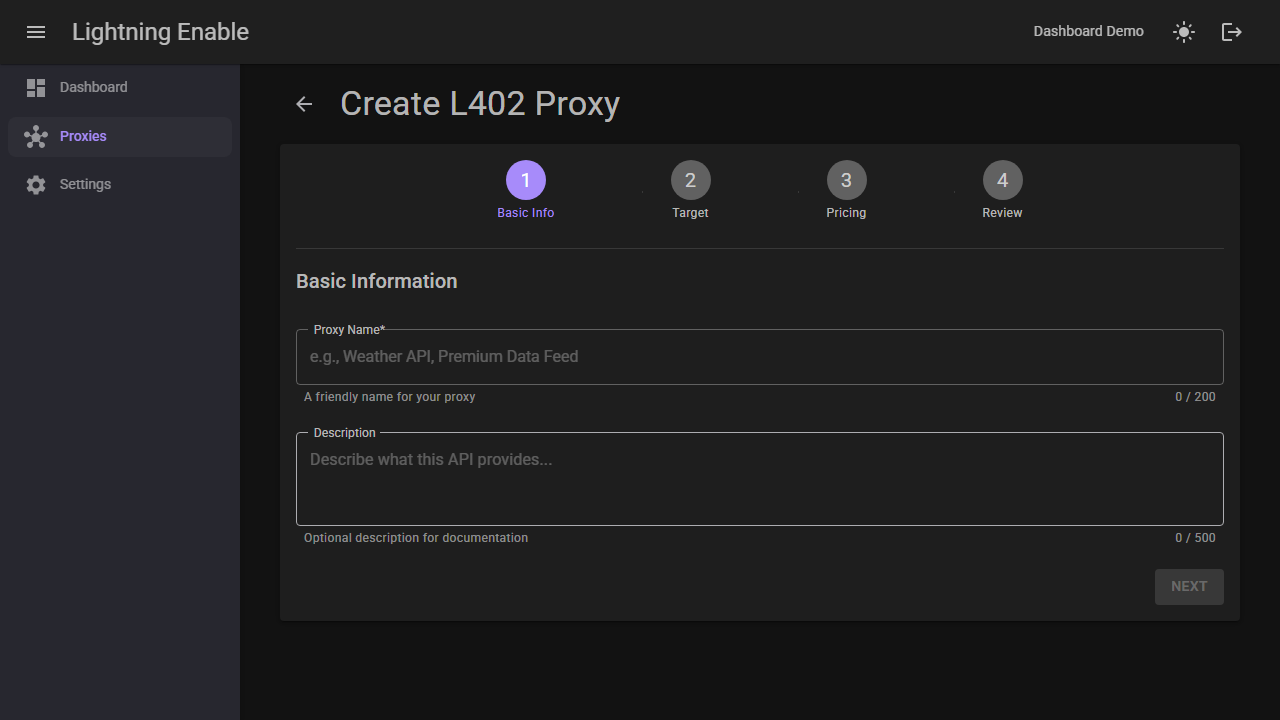
For a full visual walkthrough, see the Dashboard Guide.
Via API
curl -X POST https://api.lightningenable.com/api/proxy \
  -H "X-API-Key: your-merchant-api-key" \
  -H "Content-Type: application/json" \
  -d '{
    "name": "Premium Weather API",
    "targetBaseUrl": "https://api.weather.com/v1",
    "defaultPriceSats": 10,
    "description": "Weather data with Lightning payments"
  }'
Response (201 Created):
{
  "id": 12,
  "proxyId": "premium-weather-api-a1b2",
  "name": "Premium Weather API",
  "description": "Weather data with Lightning payments",
  "targetBaseUrl": "https://api.weather.com/v1",
  "defaultPriceSats": 10,
  "isActive": true,
  "createdAt": "2026-07-03T12:00:00Z",
  "requestCount": 0,
  "totalSatsEarned": 0,
  "endpointPricingCount": 0,
  "proxyUrl": "/l402/proxy/premium-weather-api-a1b2",
  "endpointPricings": []
}
The proxyId slug is generated from the proxy name. If the slug collides with an existing proxy, a 4-character hex suffix is appended (as in the example above); otherwise the clean slug is used as-is.
Proxy Endpoint
Your proxy is now available at:
https://api.lightningenable.com/l402/proxy/{proxyId}/{path}
For example:
https://api.lightningenable.com/l402/proxy/premium-weather-api-a1b2/forecast?city=nyc
Configuration Options
Configuration Reference
Create (POST /api/proxy) accepts:
| Field | Type | Required | Description |
|---|---|---|---|
name | string | Yes | Display name for the proxy (1–100 chars). Also used to generate the proxyId slug. |
targetBaseUrl | string | Yes | Base URL of the target API. Must be http/https with a public domain name (see SSRF Protection). |
defaultPriceSats | int | No | Default price per request in satoshis (1–1,000,000). Defaults to 10 if omitted. |
description | string | No | Proxy description (up to 500 chars). |
Update (PUT /api/proxy/{proxyId}) accepts the same fields — all optional — plus:
| Field | Type | Required | Description |
|---|---|---|---|
isActive | bool | No | Enable/disable the proxy. Disabled proxies return 404 to clients. |
There are no per-proxy method filters, path allow/block lists, or timeout settings. The proxy forwards all HTTP methods (GET, POST, PUT, DELETE, PATCH, HEAD, OPTIONS) and all paths under /l402/proxy/{proxyId}/* to the target API, with a fixed 30-second upstream timeout. If you need to restrict which endpoints are reachable, enforce that on your upstream API itself, or point targetBaseUrl at a narrower base path (e.g., https://api.example.com/v1/public).
Because there is no allowedPaths/blockedPaths setting, any path on your target API under the configured base URL is reachable through the proxy (after payment). Never point a proxy at an API surface that includes admin or internal endpoints you don't want exposed.
One limit does apply: the full L402 resource string /l402/proxy/{proxyId}/{path} can be at most 848 characters. A longer request gets 414 resource_too_long before any invoice is created — shorten the downstream path (or the proxy ID).
Token Validity
Each proxy has a configurable token validity period — how long a paid L402 token remains usable after payment. Set it in the dashboard wizard (Step 3: Pricing) when creating the proxy; if not set, tokens fall back to the global default of 1 hour.
Per-proxy token validity was fixed in the July 2026 update; earlier tokens always used the 1-hour default regardless of the value entered in the wizard.
Endpoint-Specific Pricing
You can manage endpoint-specific pricing visually in the dashboard — no API calls needed.
Set different prices for different endpoints:
curl -X POST https://api.lightningenable.com/api/proxy/{proxyId}/pricing \
  -H "X-API-Key: your-merchant-api-key" \
  -H "Content-Type: application/json" \
  -d '{
    "pathPattern": "/forecast/7day",
    "priceSats": 50,
    "description": "7-day forecast (premium)"
  }'
Multiple Price Tiers
# Add pricing for different endpoints
curl -X POST .../pricing -d '{"pathPattern": "/current/*", "priceSats": 5}'
curl -X POST .../pricing -d '{"pathPattern": "/forecast/1day", "priceSats": 10}'
curl -X POST .../pricing -d '{"pathPattern": "/forecast/7day", "priceSats": 50}'
curl -X POST .../pricing -d '{"pathPattern": "/historical/*", "priceSats": 100}'
Price Matching Priority
Pricing rules are evaluated in ascending priority order (lower number = checked first; the default is 0). The first active rule whose pathPattern matches the request path wins — there is no specificity ordering beyond that. If no rule matches, the proxy's defaultPriceSats applies.
If you have overlapping patterns (e.g., /forecast/7day and /forecast/*), give the more specific rule a lower priority value so it is checked first:
curl -X POST .../pricing -d '{"pathPattern": "/forecast/7day", "priceSats": 50, "priority": 0}'
curl -X POST .../pricing -d '{"pathPattern": "/forecast/*", "priceSats": 10, "priority": 10}'
Using the Proxy
Request Flow
- Client requests proxy endpoint (no auth):
curl https://api.lightningenable.com/l402/proxy/premium-weather-api-a1b2/forecast?city=nyc
- Proxy returns 402 with invoice:
{
  "error": "Payment Required",
  "message": "Pay the Lightning invoice to access this API",
  "proxy": {
    "id": "premium-weather-api-a1b2",
    "name": "Premium Weather API",
    "description": "Weather data with Lightning payments"
  },
  "l402": {
    "macaroon": "AgEL...",
    "invoice": "lnbc100n1p...",
    "amount_sats": 10,
    "payment_hash": "abc123...",
    "expires_at": "2026-07-03T12:10:00.0000000Z"
  },
  "instructions": {
    "step1": "Pay the Lightning invoice using any Lightning wallet",
    "step2": "Copy the preimage (proof of payment) from your wallet",
    "step3": "Include in request: Authorization: L402 <macaroon>:<preimage> (or Authorization: Payment method=\"lightning\", preimage=\"<preimage>\")"
  }
}
-
Client pays invoice, gets preimage
-
Client retries with L402 credential:
curl https://api.lightningenable.com/l402/proxy/premium-weather-api-a1b2/forecast?city=nyc \
  -H "Authorization: L402 AgEL...:abc123..."
- Proxy forwards request to target, returns response:
{
  "city": "New York",
  "forecast": [...]
}
Proxy Management
List Your Proxies
curl https://api.lightningenable.com/api/proxy \
  -H "X-API-Key: your-merchant-api-key"
Get Proxy Details
curl https://api.lightningenable.com/api/proxy/{proxyId} \
  -H "X-API-Key: your-merchant-api-key"
Update Proxy
curl -X PUT https://api.lightningenable.com/api/proxy/{proxyId} \
  -H "X-API-Key: your-merchant-api-key" \
  -d '{"defaultPriceSats": 20}'
Delete Proxy
curl -X DELETE https://api.lightningenable.com/api/proxy/{proxyId} \
  -H "X-API-Key: your-merchant-api-key"
Target API Authentication
Lightning Enable does not store or inject upstream API credentials. The proxy forwards client headers transparently and strips the incoming Authorization header (it consumes that one for the L402 payment check). There is no authHeader/authValue configuration.
If the API you are proxying requires its own authentication (an API key, bearer token, signed requests), you have two options:
- Merchant-side auth shim — put a thin endpoint you control between the proxy and the credentialed API: the proxy targets your endpoint, and your endpoint attaches the credential when calling the upstream. See Handling APIs that require authentication in the setup walkthrough for the full pattern.
- Native integration — skip the proxy and add L402 payment gating directly inside your own API with the native middleware. Your code keeps full control of upstream credentials; they never leave your infrastructure.
Analytics
The same lifetime totals are visible on the proxy detail page's Overview tab in the dashboard. Per-day charts and per-path breakdowns are on the roadmap but not available yet.
Get Proxy Analytics
curl https://api.lightningenable.com/api/proxy/{proxyId}/analytics \
  -H "X-API-Key: your-merchant-api-key"
Response — lifetime totals for the proxy (there is no time-period filtering or per-path breakdown):
{
  "proxyId": "premium-weather-api-a1b2",
  "name": "Premium Weather API",
  "totalRequests": 5234,
  "totalSatsEarned": 52340,
  "averageRevenuePerRequest": 10.00,
  "createdAt": "2026-05-01T09:00:00Z",
  "lastUpdated": "2026-07-03T11:58:21Z"
}
Testing Proxy
Test Target Reachability
curl -X POST https://api.lightningenable.com/api/proxy/{proxyId}/test \
  -H "X-API-Key: your-merchant-api-key"
Response:
{
  "success": true,
  "targetUrl": "https://api.weather.com/v1",
  "statusCode": 200,
  "statusDescription": "OK",
  "responseTimeMs": 234,
  "message": "Target API is reachable"
}
On failure, success is false and message explains why (e.g., "Request timed out after 10 seconds" or "Connection failed: ..."). The test request uses a 10-second timeout and runs the same SSRF checks as live proxy traffic.
Test with Specific Path
Pass the path as a query parameter (there is no JSON request body):
curl -X POST "https://api.lightningenable.com/api/proxy/{proxyId}/test?path=/forecast" \
  -H "X-API-Key: your-merchant-api-key"
Example Configurations
Public Weather API Proxy
An API that needs no upstream credentials — the simplest case:
{
  "name": "Weather Data",
  "description": "Public weather data with Lightning payments",
  "targetBaseUrl": "https://api.open-meteo.com/v1",
  "defaultPriceSats": 5
}
Your Own API with Tiered Pricing
Point the proxy at your API and layer endpoint-specific prices on top of the default:
{
  "name": "Market Data",
  "description": "Market data API, pay-per-request",
  "targetBaseUrl": "https://api.your-domain.com/v2",
  "defaultPriceSats": 10
}
Endpoint pricing (added via POST /api/proxy/{proxyId}/pricing):
[
  { "pathPattern": "/quotes/realtime/*", "priceSats": 50, "priority": 0 },
  { "pathPattern": "/quotes/*", "priceSats": 10, "priority": 10 }
]
Credentialed Upstream (via Auth Shim)
For an upstream that requires its own API key (e.g., an AI model provider), target a thin endpoint you host that attaches the credential — the proxy itself never holds it:
{
  "name": "AI Completions",
  "description": "Pay-per-request AI completions",
  "targetBaseUrl": "https://shim.your-domain.com/ai",
  "defaultPriceSats": 500
}
See Target API Authentication above for why this pattern is required and what the shim looks like.
Security
The L402 proxy includes several built-in protections to prevent abuse and ensure safe operation. These protections apply automatically to all proxies.
Request & Response Size Limits
The proxy enforces size limits on both inbound requests and upstream responses to prevent memory exhaustion and abuse.
| Limit | Default | Config Key | HTTP Status on Violation |
|---|---|---|---|
| Request body | 1 MB (1,048,576 bytes) | L402:MaxProxyRequestBodyBytes | 413 Payload Too Large |
| Response body | 10 MB (10,485,760 bytes) | L402:MaxProxyResponseBodyBytes | 502 Bad Gateway |
Request body limit -- When a client sends a POST, PUT, or PATCH request through the proxy, the body is checked against the configured maximum. If the Content-Length header is present and exceeds the limit, the request is rejected immediately. If the header is absent, the body is read incrementally and rejected as soon as it exceeds the limit.
Response body limit -- When the upstream target API returns a response, its size is checked the same way: first via Content-Length header for an early rejection, then by streaming and monitoring the total bytes read. If the response exceeds the limit, the proxy returns a 502 to the client instead of the oversized response.
These limits are set at the Lightning Enable service level (L402:MaxProxyRequestBodyBytes / L402:MaxProxyResponseBodyBytes) — they are not per-proxy merchant settings. If your use case needs larger payloads, contact support.
Example error response (413):
{
  "error": "Payload Too Large",
  "message": "Request body size (2,500,000 bytes) exceeds the maximum allowed size (1,048,576 bytes)",
  "proxy_id": "premium-weather-api-a1b2"
}
Example error response (502 for oversized upstream response):
{
  "error": "Bad Gateway",
  "message": "Response from target API (15,000,000 bytes) exceeds the maximum allowed size (10,485,760 bytes)",
  "proxy_id": "premium-weather-api-a1b2"
}
SSRF Protection
Server-Side Request Forgery (SSRF) protections prevent proxies from being used to access internal infrastructure. Validation happens at two stages: when configuring a proxy and at runtime when forwarding each request.
Configuration-Time Validation
When you create or update a proxy, the targetBaseUrl is validated against these rules:
| Rule | Details |
|---|---|
| Scheme | Only http and https are allowed. Other schemes (e.g., file://, ftp://) are rejected. |
| Hostname | Raw IP addresses are not allowed; a domain name is required. |
| Localhost rejection | localhost, localhost.localdomain, ip6-localhost, and ip6-loopback are blocked. |
| Internal domain suffixes | Hostnames ending in .local, .internal, .localhost, or .svc.cluster.local are blocked. |
| Port restrictions | Only standard HTTP ports (80, 443) are allowed. Non-standard ports are rejected. |
| DNS resolution check | If the hostname resolves at configuration time, all resolved IPs are checked for private ranges. If DNS resolution fails (e.g., the domain is not yet set up), the proxy is allowed but will be checked again at runtime. |
Runtime DNS Rebinding Prevention
Even if a domain passes configuration-time validation, it is checked again on every proxied request. Before connecting to the target API, the proxy resolves the hostname and verifies that none of the resolved IP addresses fall into private or reserved ranges. This prevents DNS rebinding attacks where an attacker changes a domain's DNS records to point to internal IPs after the proxy is configured.
Blocked IP ranges:
| Range | Description |
|---|---|
127.0.0.0/8 | IPv4 loopback |
10.0.0.0/8 | RFC 1918 private |
172.16.0.0/12 | RFC 1918 private |
192.168.0.0/16 | RFC 1918 private |
169.254.0.0/16 | IPv4 link-local |
0.0.0.0/8 | Current network |
::1 | IPv6 loopback |
fc00::/7 | IPv6 unique local |
fe80::/10 | IPv6 link-local |
| IPv4-mapped IPv6 | e.g., ::ffff:127.0.0.1 (mapped to IPv4 and checked) |
If a blocked IP is detected at runtime, the proxy returns a 502 Bad Gateway response:
{
  "error": "Bad Gateway",
  "message": "The target API address is not allowed",
  "proxy_id": "premium-weather-api-a1b2"
}
These protections are fully automatic. You do not need to configure anything -- they are always active for all proxies.
Error Handling
Proxy Errors
| Status | Body error | Cause | Solution |
|---|---|---|---|
| 404 | Proxy not found | Unknown or disabled proxy ID | Check the proxy ID; re-enable the proxy if you disabled it |
| 404 | Proxy unavailable | The merchant account behind the proxy is inactive | Reactivate the merchant account |
| 404 | Ambiguous proxy ID | An unsuffixed alias matches more than one proxy | Use the full proxy ID including its hex suffix |
| 502 | Bad Gateway | Target API unreachable / connection failed | Check the target URL and target API health |
| 504 | Gateway Timeout | Target API didn't respond within 30 seconds | Speed up the upstream endpoint (the timeout is fixed) |
| 413 | Payload Too Large | Request body exceeds size limit | Reduce request body or contact provider about limits |
| 414 | resource_too_long | The full /l402/proxy/{proxyId}/{path} resource exceeds 848 characters | Shorten the downstream path or the proxy ID; no invoice is created for the refused request |
| 502 | Bad Gateway (size) | Upstream response exceeds size limit | Contact provider about response size limits |
| 502 | Bad Gateway (SSRF) | Target resolves to private IP | Use a public domain name for your target API |
Error bodies include a message field with details and (for gateway errors) a proxy_id field.
Payment / Credential Errors
The proxy never returns 401 or 403. Any missing, malformed, expired, or otherwise invalid L402 credential results in a fresh 402 Payment Required challenge — a new invoice and macaroon — with the failure reason in the X-L402-Error response header and in the body's message field.
| Status | Meaning | What the client should do |
|---|---|---|
402 (no X-L402-Error) | First request — payment required | Pay the invoice, retry with Authorization: L402 <macaroon>:<preimage> |
402 + X-L402-Error | The presented credential failed verification (bad format, wrong preimage, expired token, wrong path/merchant/price) | Read the header for the reason; pay the new invoice from this response and retry |
Clients that branch on 401/403 will never hit those branches — treat every 402 as a (re-)challenge.
Best Practices
Security
- Keep upstream API credentials on your own infrastructure (auth shim or native integration) — the proxy does not store them
- Scope
targetBaseUrlto the narrowest base path that serves your paying clients; every path under it is reachable - Never expose an API surface containing admin or internal endpoints through a proxy
- Monitor usage for abuse
- Use HTTPS target URLs whenever possible
Pricing
- Research target API costs
- Add reasonable markup (20-50%)
- Consider volume discounts
- Price based on value, not cost
Reliability
- Keep upstream responses under the fixed 30-second proxy timeout
- Handle target API errors gracefully
- Monitor target API availability
- Have fallback targets if possible
Next Steps
- Dashboard Guide - Visual proxy management walkthrough
- API Reference - Complete L402 API docs
- How It Works - Technical details
- FAQ - Common questions