Proxy Configuration
The L402 Proxy allows you to monetize any API - yours or third-party - by creating a payment-gated reverse proxy.
The L402 proxy is a fully hosted service. You configure it; Lightning Enable runs it. No Lightning node, no servers, no Docker.
Overview
The proxy sits between clients and target APIs:
Client → L402 Proxy → Target API
           │
           └─ Requires Lightning payment
Use cases:
- Monetize your own APIs — in Proxy mode (no modification) or via native middleware (one-line drop-in)
- Resell third-party APIs with a markup
- Create premium access to public APIs
- Rate-limit expensive APIs via micropayments
Creating a Proxy
Via Dashboard (Recommended)
Navigate to api.lightningenable.com/dashboard/proxies/create and follow the 4-step wizard:
- Basic Info — name and description
- Target URL — the API you want to monetize
- Pricing — satoshis per request + token validity
- Review — confirm and create
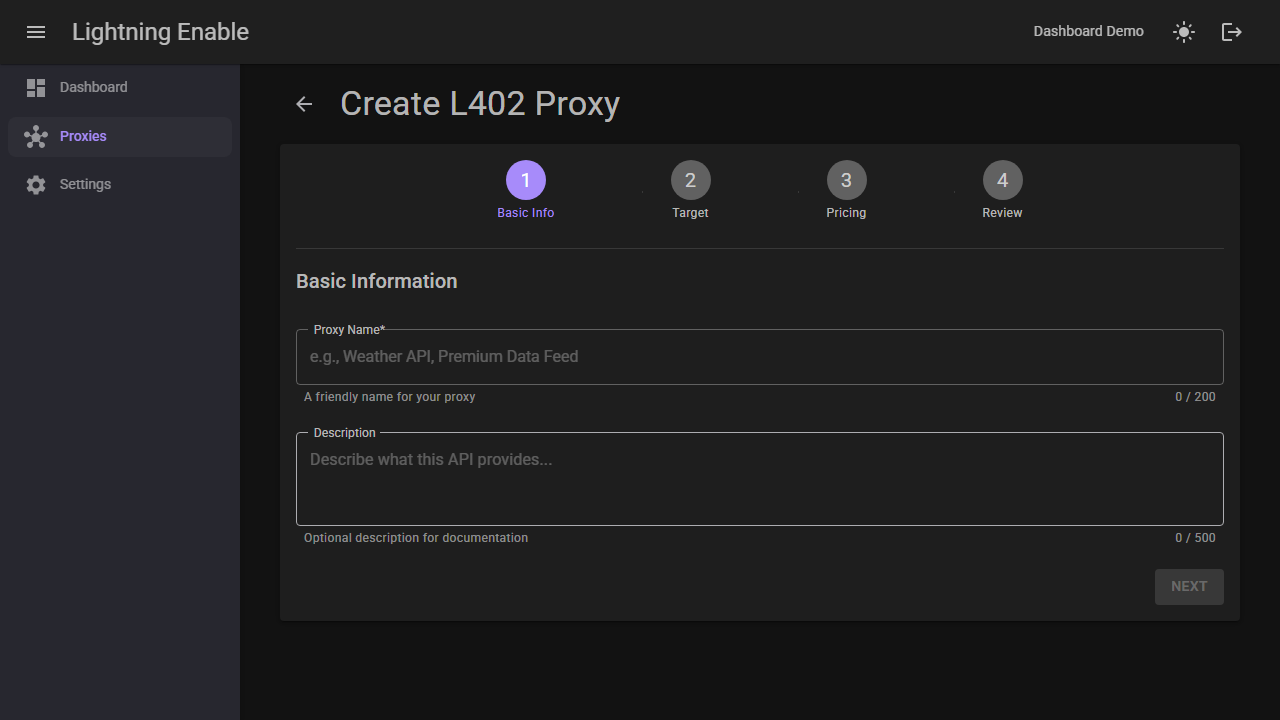
For a full visual walkthrough, see the Dashboard Guide.
Via API
curl -X POST https://api.lightningenable.com/api/proxy \
  -H "X-API-Key: your-merchant-api-key" \
  -H "Content-Type: application/json" \
  -d '{
    "name": "Premium Weather API",
    "targetBaseUrl": "https://api.weather.com/v1",
    "defaultPriceSats": 10,
    "description": "Weather data with Lightning payments"
  }'
Response:
{
  "proxyId": "premium-weather-api-a1b2",
  "name": "Premium Weather API",
  "targetBaseUrl": "https://api.weather.com/v1",
  "defaultPriceSats": 10,
  "isActive": true,
  "createdAt": "2024-12-29T12:00:00Z"
}
Proxy Endpoint
Your proxy is now available at:
https://api.lightningenable.com/l402/proxy/{proxyId}/{path}
For example:
https://api.lightningenable.com/l402/proxy/premium-weather-api-a1b2/forecast?city=nyc
Configuration Options
Full Configuration
{
  "name": "Premium Weather API",
  "description": "Weather data via Lightning payments",
  "targetBaseUrl": "https://api.weather.com/v1",
  "defaultPriceSats": 10,
  "isActive": true,
  "authHeader": "X-Api-Key",
  "authValue": "your-weather-api-key",
  "timeout": 30,
  "allowedMethods": ["GET", "POST"],
  "allowedPaths": ["/forecast/*", "/current/*"],
  "blockedPaths": ["/admin/*"]
}
Configuration Reference
| Field | Type | Required | Description |
|---|---|---|---|
name | string | Yes | Display name for the proxy |
targetBaseUrl | string | Yes | Base URL of target API |
defaultPriceSats | int | Yes | Default price per request |
description | string | No | Proxy description |
isActive | bool | No | Enable/disable proxy (default: true) |
authHeader | string | No | Header name for target API auth |
authValue | string | No | Header value for target API auth |
timeout | int | No | Request timeout in seconds (default: 30) |
allowedMethods | array | No | Allowed HTTP methods |
allowedPaths | array | No | Path whitelist (glob patterns) |
blockedPaths | array | No | Path blacklist (glob patterns) |
Endpoint-Specific Pricing
You can manage endpoint-specific pricing visually in the dashboard — no API calls needed.
Set different prices for different endpoints:
curl -X POST https://api.lightningenable.com/api/proxy/{proxyId}/pricing \
  -H "X-API-Key: your-merchant-api-key" \
  -H "Content-Type: application/json" \
  -d '{
    "pathPattern": "/forecast/7day",
    "priceSats": 50,
    "description": "7-day forecast (premium)"
  }'
Multiple Price Tiers
# Add pricing for different endpoints
curl -X POST .../pricing -d '{"pathPattern": "/current/*", "priceSats": 5}'
curl -X POST .../pricing -d '{"pathPattern": "/forecast/1day", "priceSats": 10}'
curl -X POST .../pricing -d '{"pathPattern": "/forecast/7day", "priceSats": 50}'
curl -X POST .../pricing -d '{"pathPattern": "/historical/*", "priceSats": 100}'
Price Matching Priority
Prices are matched in order of specificity:
- Exact path match
- Glob pattern match (most specific first)
- Default proxy price
Using the Proxy
Request Flow
- Client requests proxy endpoint (no auth):
curl https://api.lightningenable.com/l402/proxy/premium-weather-api-a1b2/forecast?city=nyc
- Proxy returns 402 with invoice:
{
  "error": "Payment Required",
  "l402": {
    "macaroon": "AgEL...",
    "invoice": "lnbc100n1p...",
    "amount_sats": 10
  }
}
-
Client pays invoice, gets preimage
-
Client retries with L402 credential:
curl https://api.lightningenable.com/l402/proxy/premium-weather-api-a1b2/forecast?city=nyc \
  -H "Authorization: L402 AgEL...:abc123..."
- Proxy forwards request to target, returns response:
{
  "city": "New York",
  "forecast": [...]
}
Proxy Management
List Your Proxies
curl https://api.lightningenable.com/api/proxy \
  -H "X-API-Key: your-merchant-api-key"
Get Proxy Details
curl https://api.lightningenable.com/api/proxy/{proxyId} \
  -H "X-API-Key: your-merchant-api-key"
Update Proxy
curl -X PUT https://api.lightningenable.com/api/proxy/{proxyId} \
  -H "X-API-Key: your-merchant-api-key" \
  -d '{"defaultPriceSats": 20}'
Delete Proxy
curl -X DELETE https://api.lightningenable.com/api/proxy/{proxyId} \
  -H "X-API-Key: your-merchant-api-key"
Target API Authentication
Header-Based Auth
{
  "authHeader": "Authorization",
  "authValue": "Bearer your-api-token"
}
API Key Header
{
  "authHeader": "X-Api-Key",
  "authValue": "your-api-key"
}
Query Parameter Auth
For APIs requiring query parameter auth, include in target URL:
{
  "targetBaseUrl": "https://api.example.com/v1?apikey=your-key"
}
Auth credentials are stored encrypted and never exposed to clients.
Analytics
View interactive charts and top endpoints in the dashboard analytics tab.
Get Proxy Analytics
curl https://api.lightningenable.com/api/proxy/{proxyId}/analytics \
  -H "X-API-Key: your-merchant-api-key"
Response:
{
  "proxyId": "premium-weather-api-a1b2",
  "period": "last_30_days",
  "totalRequests": 5234,
  "totalSatsEarned": 52340,
  "topPaths": [
    { "path": "/forecast/7day", "requests": 2341, "sats": 23410 },
    { "path": "/current/conditions", "requests": 1892, "sats": 9460 }
  ]
}
Testing Proxy
Test Target Reachability
curl -X POST https://api.lightningenable.com/api/proxy/{proxyId}/test \
  -H "X-API-Key: your-merchant-api-key"
Response:
{
  "success": true,
  "responseTime": 234,
  "statusCode": 200
}
Test with Specific Path
curl -X POST .../test \
  -d '{"testPath": "/forecast?city=nyc"}'
Example Configurations
OpenAI API Proxy
{
  "name": "GPT-4 Proxy",
  "targetBaseUrl": "https://api.openai.com/v1",
  "defaultPriceSats": 100,
  "authHeader": "Authorization",
  "authValue": "Bearer sk-...",
  "allowedPaths": ["/chat/completions"],
  "allowedMethods": ["POST"]
}
Endpoint pricing:
[
  { "pathPattern": "/chat/completions", "priceSats": 500 }
]
Weather API Proxy
{
  "name": "Weather Data",
  "targetBaseUrl": "https://api.weatherapi.com/v1",
  "defaultPriceSats": 5,
  "authHeader": "key",
  "authValue": "your-weather-key"
}
Stock Data Proxy
{
  "name": "Stock Market Data",
  "targetBaseUrl": "https://api.polygon.io/v2",
  "defaultPriceSats": 10,
  "authHeader": "Authorization",
  "authValue": "Bearer your-polygon-key",
  "allowedPaths": ["/aggs/*", "/ticker/*"]
}
Security
The L402 proxy includes several built-in protections to prevent abuse and ensure safe operation. These protections apply automatically to all proxies.
Request & Response Size Limits
The proxy enforces size limits on both inbound requests and upstream responses to prevent memory exhaustion and abuse.
| Limit | Default | Config Key | HTTP Status on Violation |
|---|---|---|---|
| Request body | 1 MB (1,048,576 bytes) | L402:MaxProxyRequestBodyBytes | 413 Payload Too Large |
| Response body | 10 MB (10,485,760 bytes) | L402:MaxProxyResponseBodyBytes | 502 Bad Gateway |
Request body limit -- When a client sends a POST, PUT, or PATCH request through the proxy, the body is checked against the configured maximum. If the Content-Length header is present and exceeds the limit, the request is rejected immediately. If the header is absent, the body is read incrementally and rejected as soon as it exceeds the limit.
Response body limit -- When the upstream target API returns a response, its size is checked the same way: first via Content-Length header for an early rejection, then by streaming and monitoring the total bytes read. If the response exceeds the limit, the proxy returns a 502 to the client instead of the oversized response.
To override the defaults, set the values in your appsettings.json under the L402 section:
{
  "L402": {
    "MaxProxyRequestBodyBytes": 2097152,
    "MaxProxyResponseBodyBytes": 20971520
  }
}
Set a value to 0 to disable that particular limit (not recommended in production).
Example error response (413):
{
  "error": "Payload Too Large",
  "message": "Request body size (2,500,000 bytes) exceeds the maximum allowed size (1,048,576 bytes)",
  "proxy_id": "premium-weather-api-a1b2"
}
Example error response (502 for oversized upstream response):
{
  "error": "Bad Gateway",
  "message": "Response from target API (15,000,000 bytes) exceeds the maximum allowed size (10,485,760 bytes)",
  "proxy_id": "premium-weather-api-a1b2"
}
SSRF Protection
Server-Side Request Forgery (SSRF) protections prevent proxies from being used to access internal infrastructure. Validation happens at two stages: when configuring a proxy and at runtime when forwarding each request.
Configuration-Time Validation
When you create or update a proxy, the targetBaseUrl is validated against these rules:
| Rule | Details |
|---|---|
| Scheme | Only http and https are allowed. Other schemes (e.g., file://, ftp://) are rejected. |
| Hostname | Raw IP addresses are not allowed; a domain name is required. |
| Localhost rejection | localhost, localhost.localdomain, ip6-localhost, and ip6-loopback are blocked. |
| Internal domain suffixes | Hostnames ending in .local, .internal, .localhost, or .svc.cluster.local are blocked. |
| Port restrictions | Only standard HTTP ports (80, 443) are allowed. Non-standard ports are rejected. |
| DNS resolution check | If the hostname resolves at configuration time, all resolved IPs are checked for private ranges. If DNS resolution fails (e.g., the domain is not yet set up), the proxy is allowed but will be checked again at runtime. |
Runtime DNS Rebinding Prevention
Even if a domain passes configuration-time validation, it is checked again on every proxied request. Before connecting to the target API, the proxy resolves the hostname and verifies that none of the resolved IP addresses fall into private or reserved ranges. This prevents DNS rebinding attacks where an attacker changes a domain's DNS records to point to internal IPs after the proxy is configured.
Blocked IP ranges:
| Range | Description |
|---|---|
127.0.0.0/8 | IPv4 loopback |
10.0.0.0/8 | RFC 1918 private |
172.16.0.0/12 | RFC 1918 private |
192.168.0.0/16 | RFC 1918 private |
169.254.0.0/16 | IPv4 link-local |
0.0.0.0/8 | Current network |
::1 | IPv6 loopback |
fc00::/7 | IPv6 unique local |
fe80::/10 | IPv6 link-local |
| IPv4-mapped IPv6 | e.g., ::ffff:127.0.0.1 (mapped to IPv4 and checked) |
If a blocked IP is detected at runtime, the proxy returns a 502 Bad Gateway response:
{
  "error": "Bad Gateway",
  "message": "The target API address is not allowed",
  "proxy_id": "premium-weather-api-a1b2"
}
These protections are fully automatic. You do not need to configure anything -- they are always active for all proxies.
Error Handling
Proxy Errors
| Error | Cause | Solution |
|---|---|---|
proxy_not_found | Invalid proxyId | Check proxy ID |
proxy_inactive | Proxy disabled | Reactivate proxy |
target_unreachable | Target API down | Check target URL |
target_timeout | Target too slow | Increase timeout |
path_not_allowed | Path blocked | Check allowedPaths |
| 413 Payload Too Large | Request body exceeds size limit | Reduce request body or contact provider about limits |
| 502 Bad Gateway (size) | Upstream response exceeds size limit | Contact provider about response size limits |
| 502 Bad Gateway (SSRF) | Target resolves to private IP | Use a public domain name for your target API |
Client Errors
| Error | Cause | Solution |
|---|---|---|
| 402 | Payment required | Pay invoice |
| 401 | Invalid L402 | Check credential format |
| 403 | Token expired | Get new token |
Best Practices
Security
- Store target API credentials securely
- Use allowedPaths to restrict access
- Block sensitive paths (/admin, /internal)
- Monitor usage for abuse
- Use HTTPS target URLs whenever possible
Pricing
- Research target API costs
- Add reasonable markup (20-50%)
- Consider volume discounts
- Price based on value, not cost
Reliability
- Set appropriate timeouts
- Handle target API errors gracefully
- Monitor target API availability
- Have fallback targets if possible
Next Steps
- Dashboard Guide - Visual proxy management walkthrough
- API Reference - Complete L402 API docs
- How It Works - Technical details
- FAQ - Common questions